Caribou
Turning SKU complexity into controlled self-service
Redesigning a week-long, Operations-heavy collaboration workflow into a visual control system that enables business teams to configure, verify, and safely manage printing assets across 10 regional storefronts.
The redesigned system allowed Licensing teams to manage printing rules without understanding the underlying SKU structure, reduced repetitive configuration work for Operations, and gave multiple business teams a shared place to inspect the current configuration.
Role
Lead UX designer
Team
PM / Dev Team of 3 / UX Designer
Timeline
Apr. - Aug. 2024 (20 weeks)
Users
Licensing Team / Marketing Team
Product
Caribou - Design Studio feature
Core Outcome
~1 week operation → ~½ day
— Caribou became the human-readable layer between business intent and a legacy SKU-driven infrastructure.
01—From fragile handoffs to controlled ownership
Every collaboration started with relatively understandable business decisions:
Which printing assets are included?
Which products and devices can use them?
Where can they be sold?
When should they launch?
How should they appear on the storefront?
But implementing those decisions was much more complicated.
The underlying commerce infrastructure was organized around SKU IDs, technical codes, product combinations, and regional configurations. As a result, Licensing team could define what should happen, but Operational Specialists had to translate those requirements into something the system understood.
That translation became a week-long operational workflow involving multiple departments, repetitive configuration, difficult verification, and limited visibility into what was actually live.
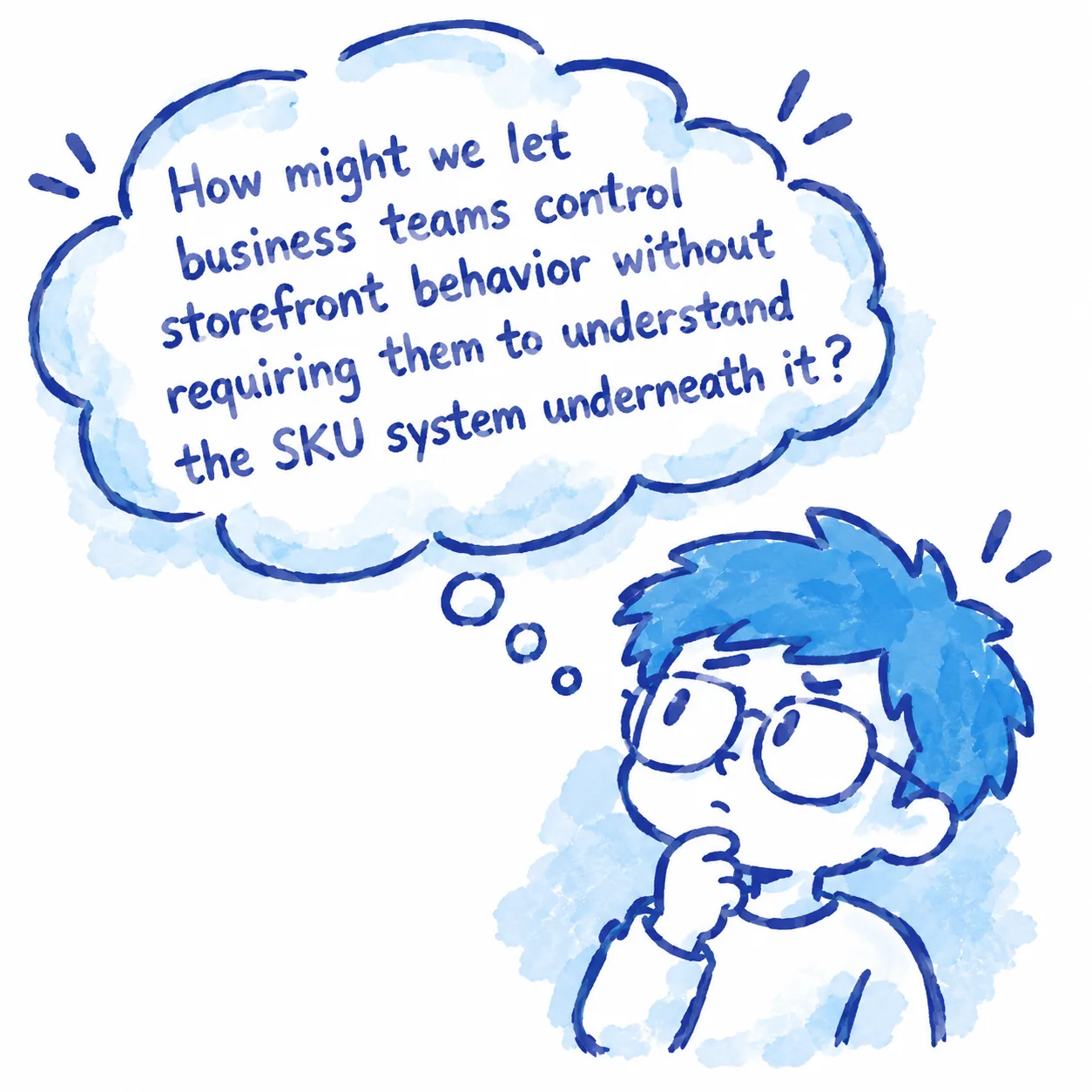
The problem wasn't simply that the process was slow. But the people who understood the business rules weren't the people who controlled how those rules were implemented.
Our goal became to close that gap without rebuilding the underlying legacy infrastructure.
02—What is a SKU
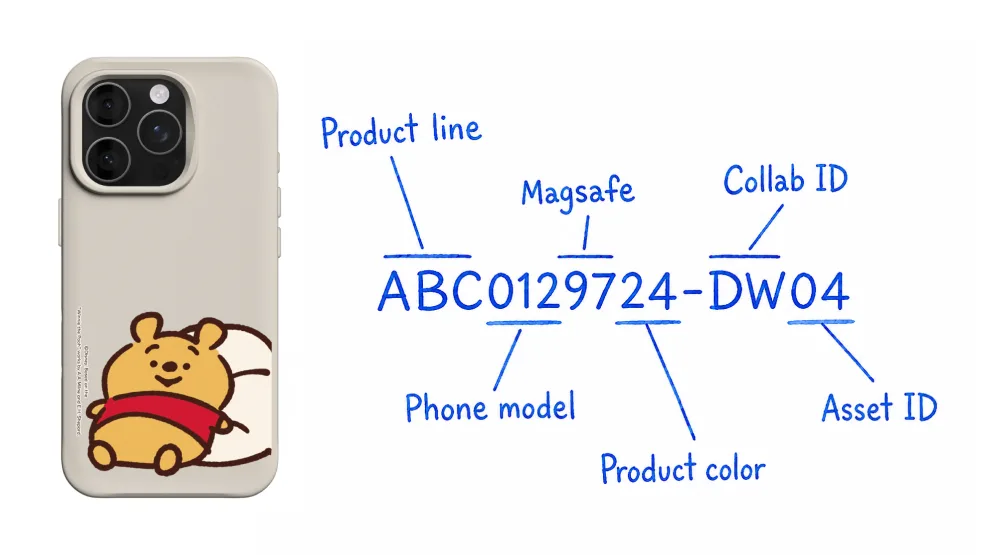
Stock Keeping Unit is an unique alphanumeric code (made of letters and numbers) that a business assigns to a specific product or product variation for internal inventory tracking
The term "SKU" will be used throughout this case study and it is one of the core issue that led to the design of Caribou.
03—A collaboration launch was more complicated than it looked
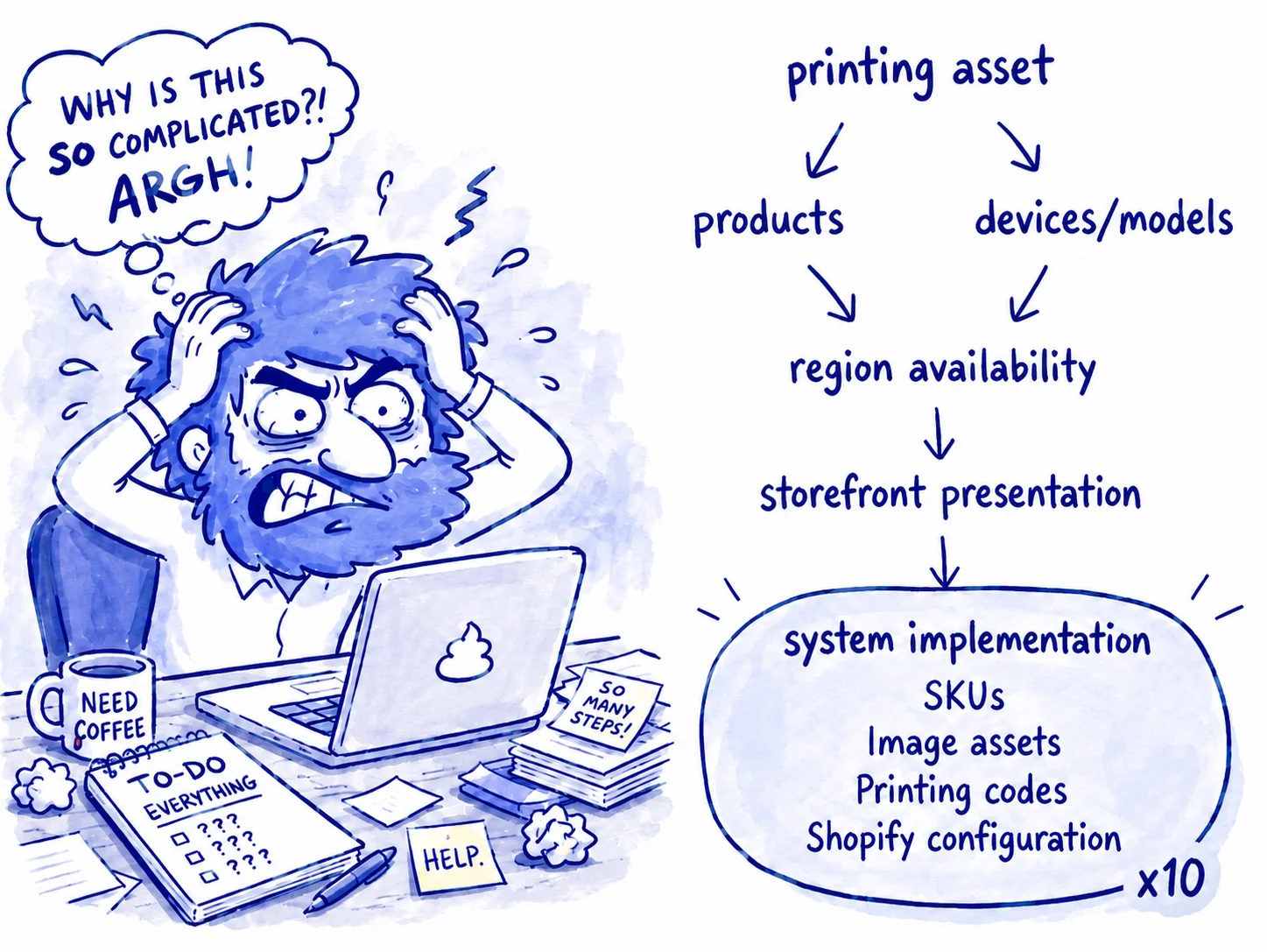
A collaboration might begin with a requirement as simple as:
“These 10 designs should launch in APAC on April 1 and support these products and devices.”
But each printing could carry several relationships and constraints.
product compatibility
device compatibility
regional availability
launch and expiration timing
storefront presentation rules
exclusions or special display requirements
Those decisions ultimately had to be translated into technical product configurations across 10 regional storefronts. Different regional licensing teams could even hold separate contracts with the same IP, with different printings, availability periods, themes, or commercial terms.
04—The real cost of an error wasn't making the mistake.
It was recovering from it.
One recurring problem was an accidental early launch. A collaboration could become available before its contractual launch time. When Licensing noticed the problem, they couldn't immediately stop it themselves. The emergency response looked more like this:
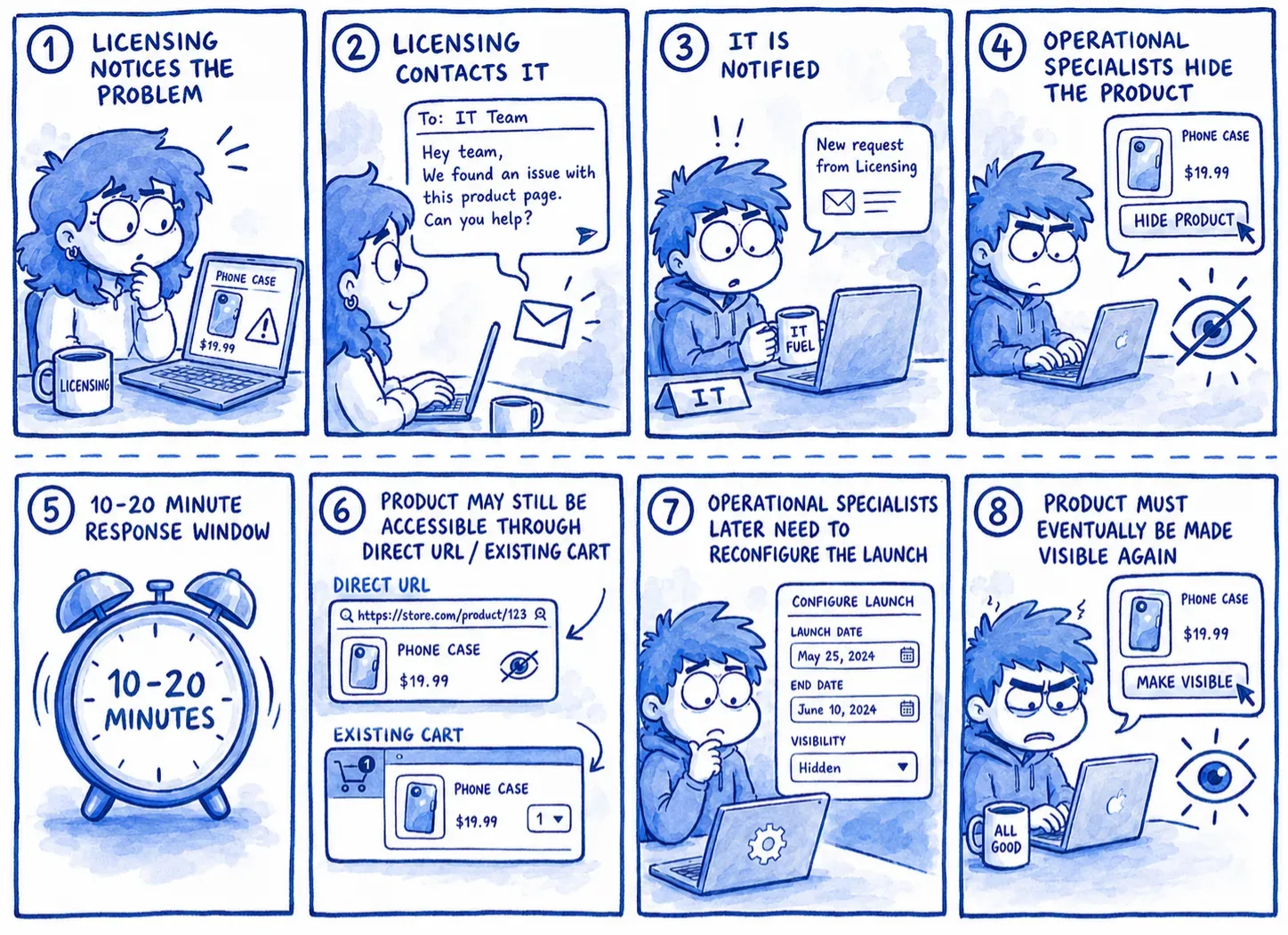
Even this emergency response wasn't a true rollback.
Hiding the product removed it from normal storefront visibility, but customers who already had the URL—or had already placed the item in a cart—could potentially still access it. There could also be a 10–20 minute response window while teams coordinated the fix. Depending on the collaboration, an early launch could create contractual and financial consequences.
The old system made mistakes possible, but recovery difficult.
That realization changed the design problem. We couldn't design under the assumption that no one would ever make a mistake.
05—We had to reconstruct the workflow before we could redesign it
There wasn't an existing process map we could simply optimize. Everyone knew something was wrong. Operations was overwhelmed, launches were painful, and errors were difficult to investigate. But there wasn't a shared explanation for why.
Processes had evolved over time through legacy system constraints, historical workarounds, regional exceptions, and personal practices—including workflows created by employees who had already left the company. So discovery became a kind of workflow archaeology.
Rather than asking teams what feature they wanted, we reconstructed what actually happened.
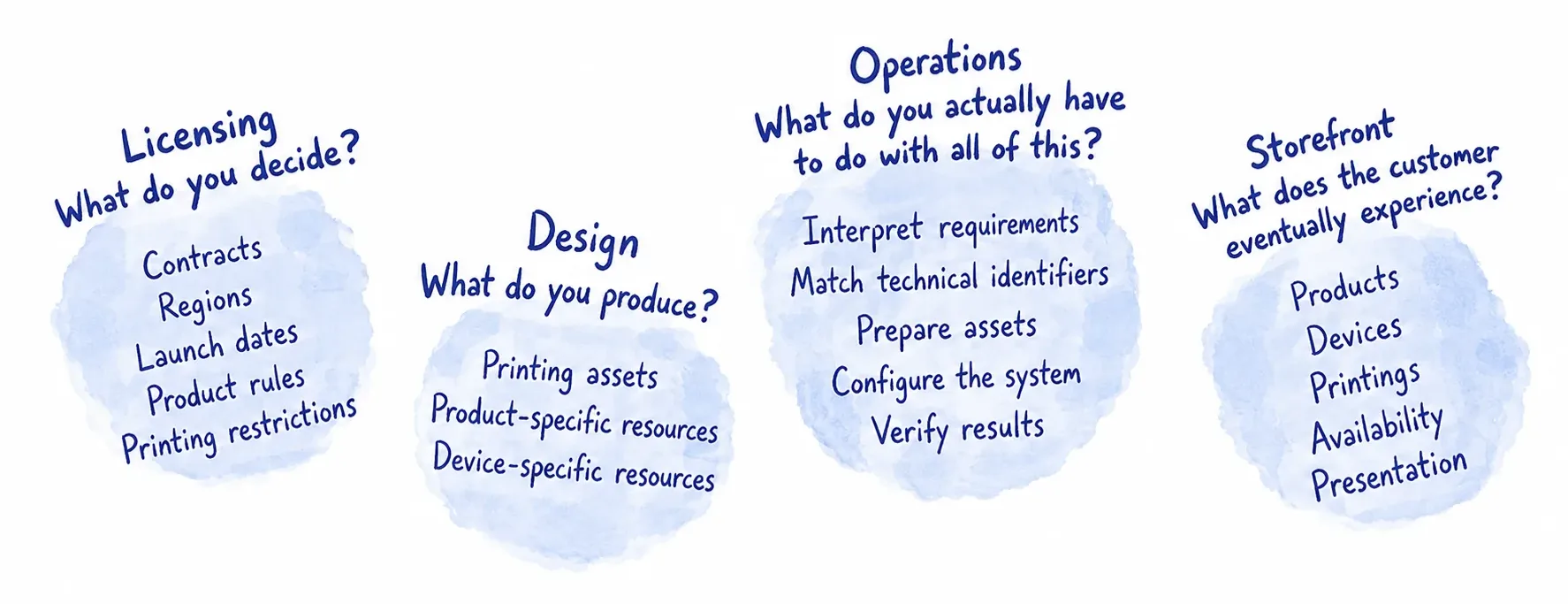
The research revealed that the organization had a complicated process but no shared mental model of that process. Workflows and knowledge were fragmented across departments.
Licensing understood the business rules
Operational Specialists understood the SKU
Design understood the printing assets
Nobody had a complete view of how those pieces became storefront behavior.

06—Hide the complexity, not the information
During the first iteration, our first instinct was to optimize the database operation. Technically, the fastest solution seems straightforward:
Upload structured SKU data
Process large numbers of records
Update everything at once
This became the "Batch Import" feature.
It was efficient. But it assumed something that was not true for many of the people we wanted to empower:
Licensing team users understood the collaboration, but they did not understand the SKU structure.
This solution was optimized around how the system worked rather than how its user thought. After talking to the Licensing team, the feedback forced us to reconsider that assumption. The most efficient workflow for the system was not necessarily the most understandable workflow for the users.
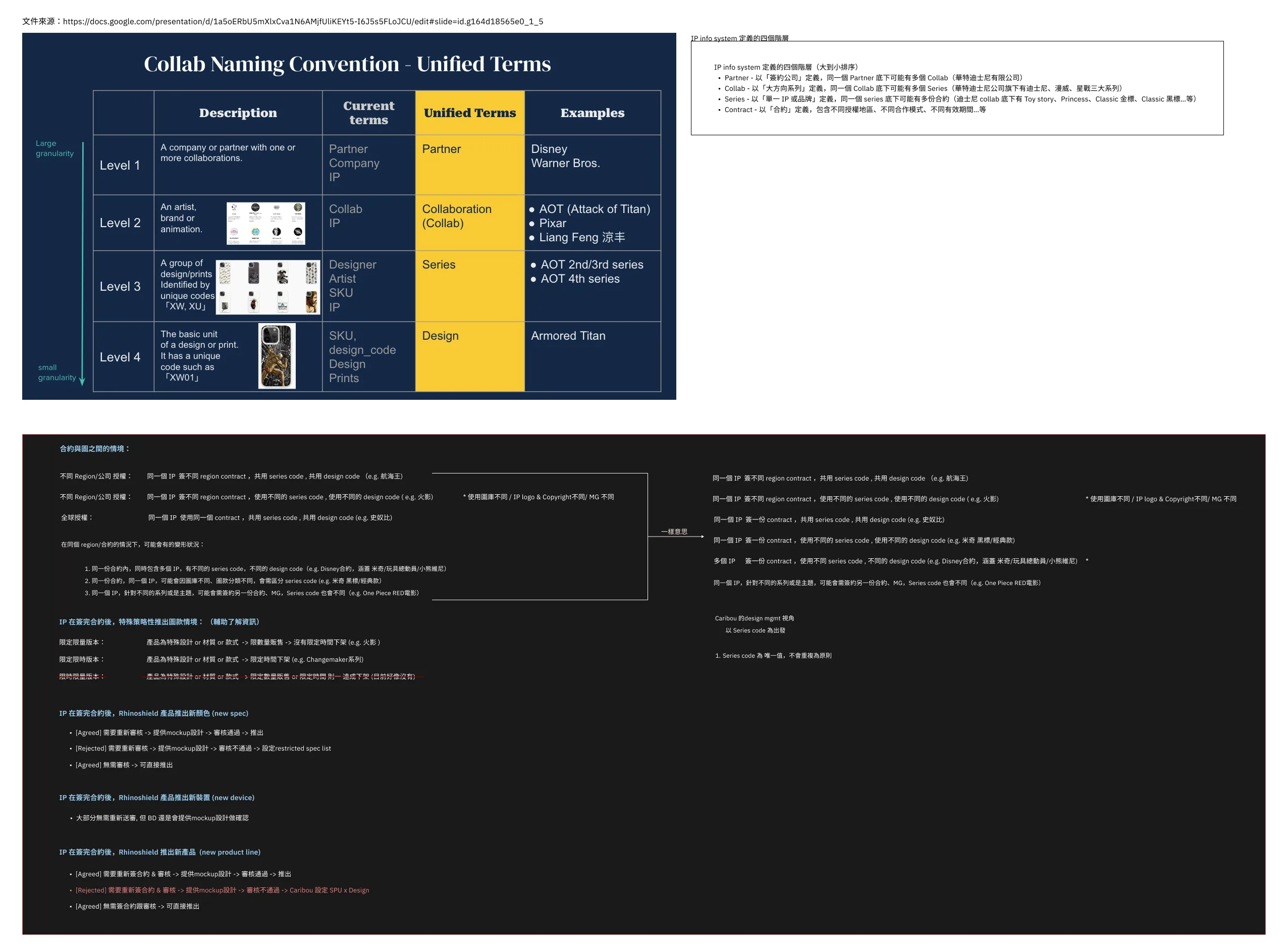
Understanding licensing contracts and their use cases
07—From chaos to a system model
I looked across scenarios to find the rules they had in common.
Discovery produced a large number of scenarios:
New collaboration
New phone model
New product line
New printing assets
Compatibility changes
Launch-date change
Regional change
Display exception
Existing configuration update
Trying to design each scenario independently would simply recreate the fragmentation we were trying to remove. Instead, I used a funnel-shaped process.
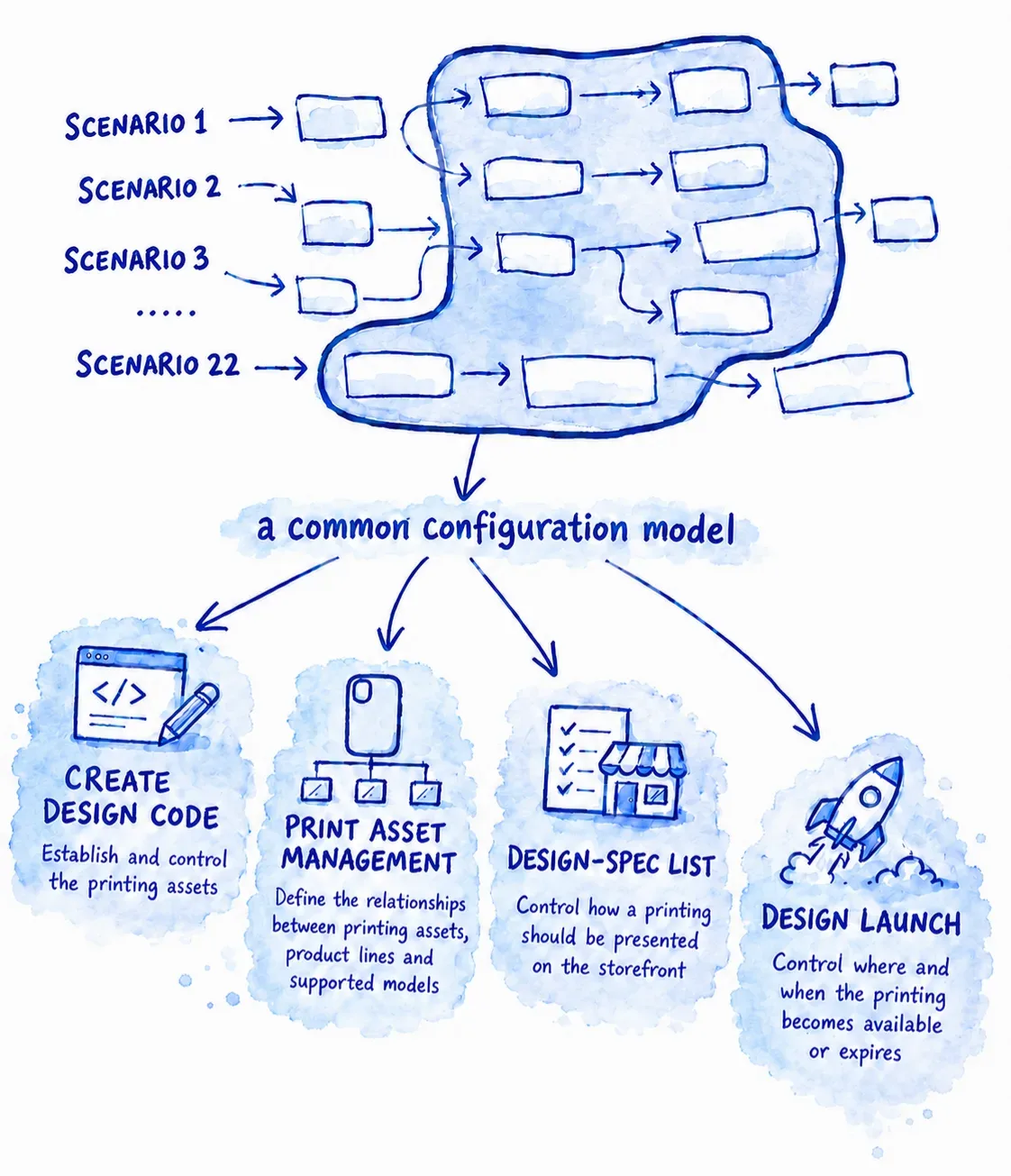
I intentionally decomposed the process into four progressive layers, each building on the one before it. This hierarchy reflects the recurring business decisions the team uncovered during research and turns them into a clear, shared workflow.
Users move through the layers in sequence. If a required decision is incomplete or incorrectly configured, dependent actions in the following layer remain unavailable. This prevents users from skipping critical steps and makes the relationships between decisions explicit.
The goal was not only to simplify the task, but also to reinforce a workflow that teams across the company had collectively agreed on. By visualizing the dependencies and system states, Caribou also helps users identify and resolve configuration issues on their own before escalating them to IT.
08—Designing the guided workflow
We designed around the questions users ask while doing high-risk work.
Clear tasks and recognizable business language were used
Dependencies and sequential guidance that helps users progress
Selection counts, explicit states, reviews screens, and change summaries were introduced to reduce cognitive loadings
Visible configuration, status information and understandable error states
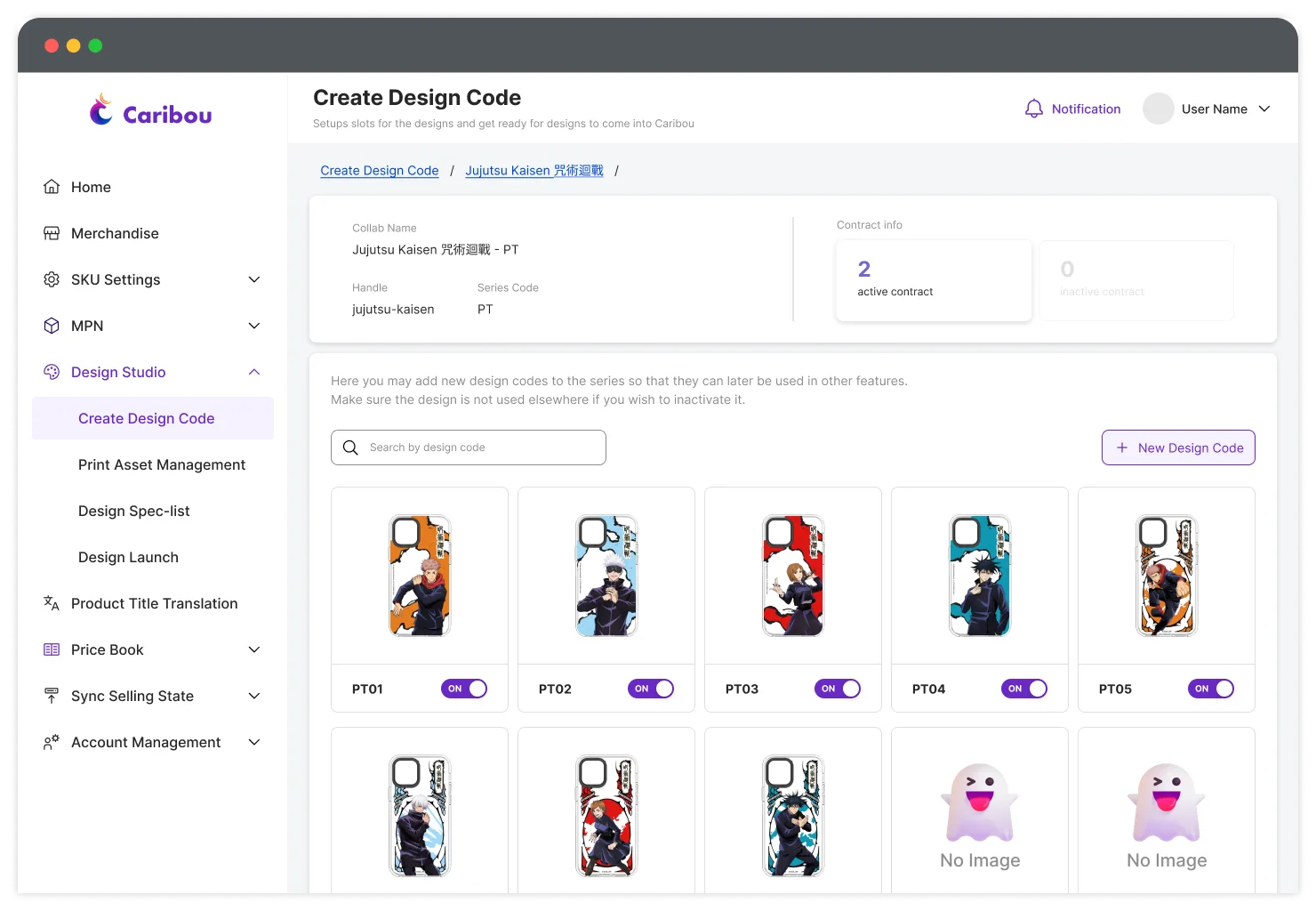
All printing assets under the same contract are displayed together
Create Design Code—Establish what exists
When Licensing knows a collaboration contains a certain number of printing assets, they create corresponding design-code records. For example:
10 expected printings → 10 design-code slots
Once the slots are created, Caribou syncs with the Design team's asset database. When the Design team completes the corresponding assets, those images become visible inside Caribou. Looking at the images is way easier than looking into PT01, PT02, etc, when double-checking before moving on to the next layer.
A "master switch" feature is also implemented at this level. Any assets can be activated or disabled without modifying the underlying product.
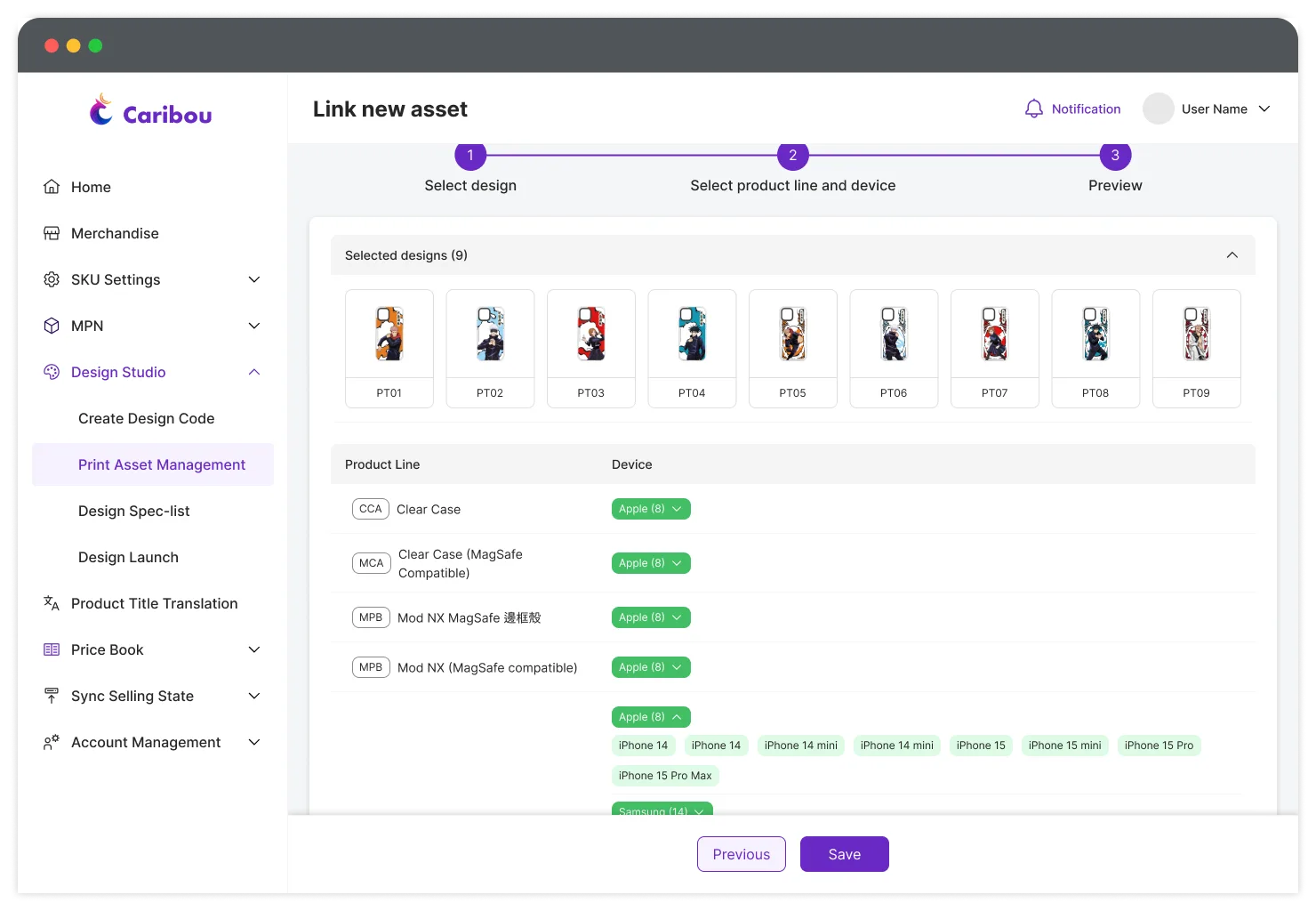
Printing assets that share the same configuration can be applied together
Print Asset Management—Turning technical relationships into recognizable business choices
Once the assets are there, users establish the relationships between:
Printing asset ↔ Product line ↔ Model
The underlying relationship may involve any SKU combinations. The user does not need to those combinations, instead they work with familiar product and device names (iPhone 16 Pro vs. 056).
The interface also reduces irrelevant choices as earlier decision are made. For example, if the configuration is about a phone case, all other products lines do not need to compete for the user's attention.
Reduce the decision space before asking for the next decision. The system absorbs relationships that previously had to exist in the user's head.
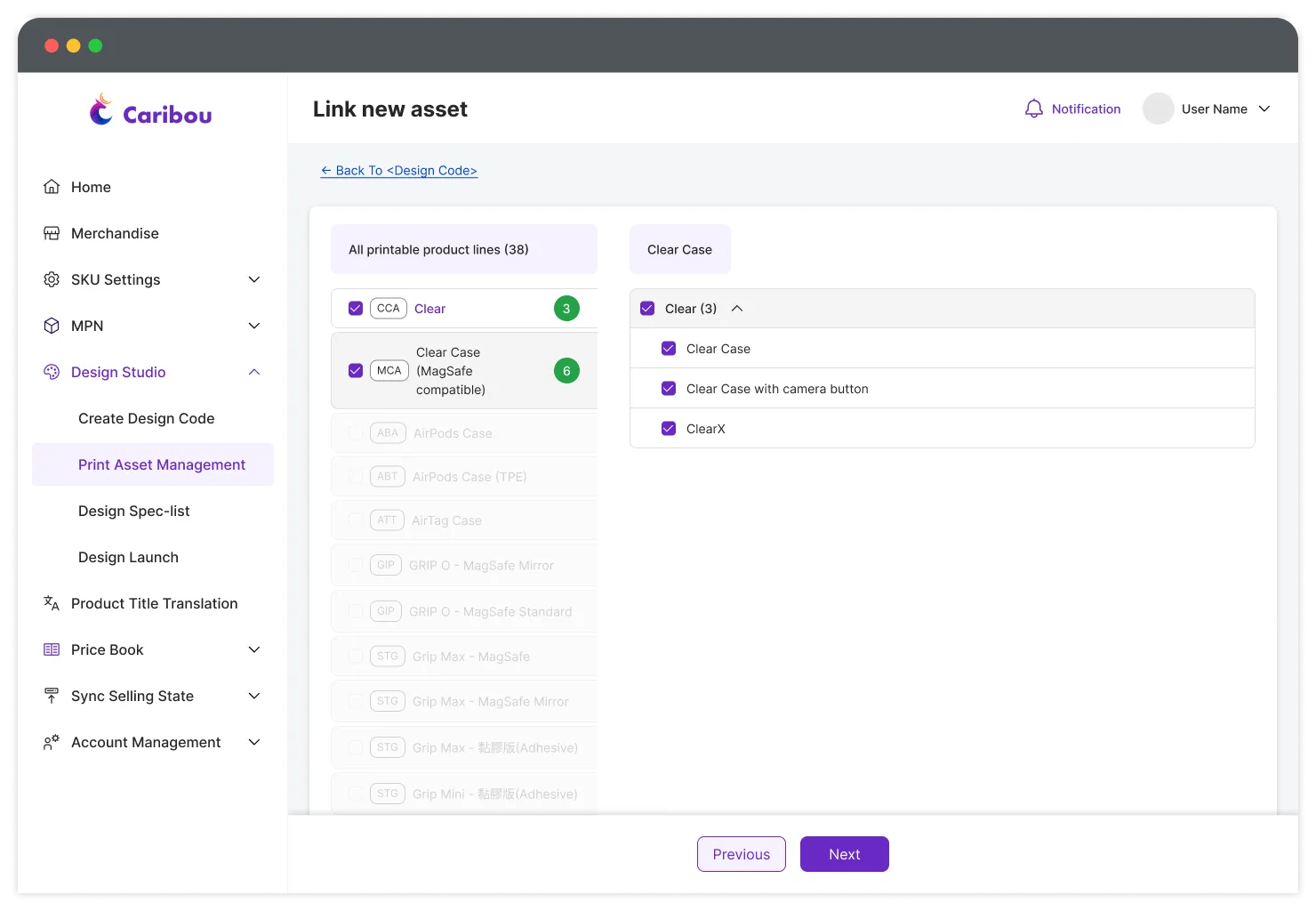
Lowering cognitive loads
Through observation with the Licensing team, I found that experienced users often relied on product count as a quick validation method. For example, knowing that Clear Case and Clear Case with MagSafe should have total 3 and 6 models helped them confirm that a setup was correct.
Caribou also supports this behavior with the Selection Counts and Removes Irrelevant Choices. Once a phone -case product line is selected, unrelated options—such as AirPods— are automatically disabled.
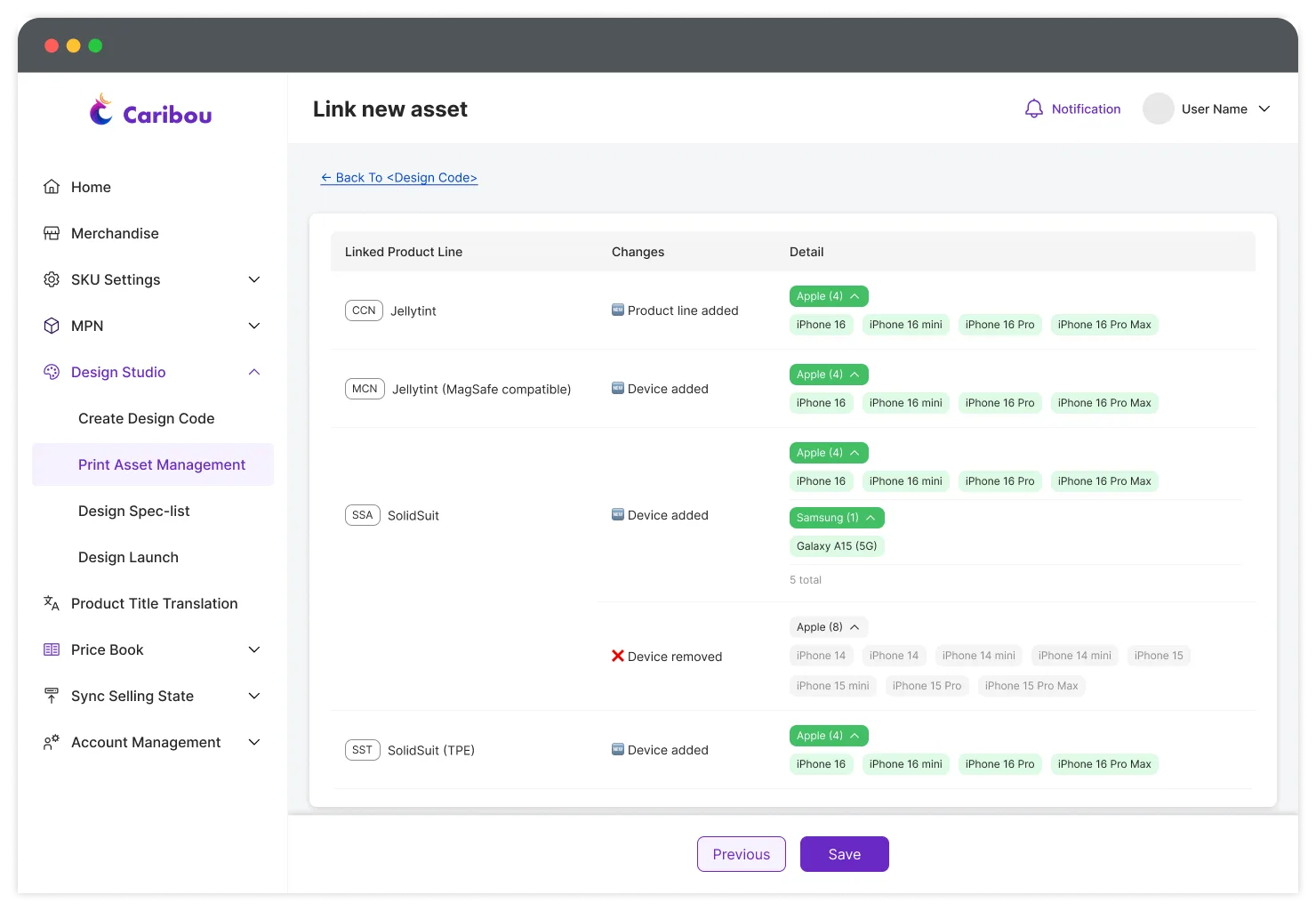
Visible dependencies
Everything is presented in Human-Readable Terms, so users do not need SKU knowledge to complete the task. The interface clearly communicates what can and cannot be configured next, while a final change summary gives users a last checkpoint to verify their work before moving on.
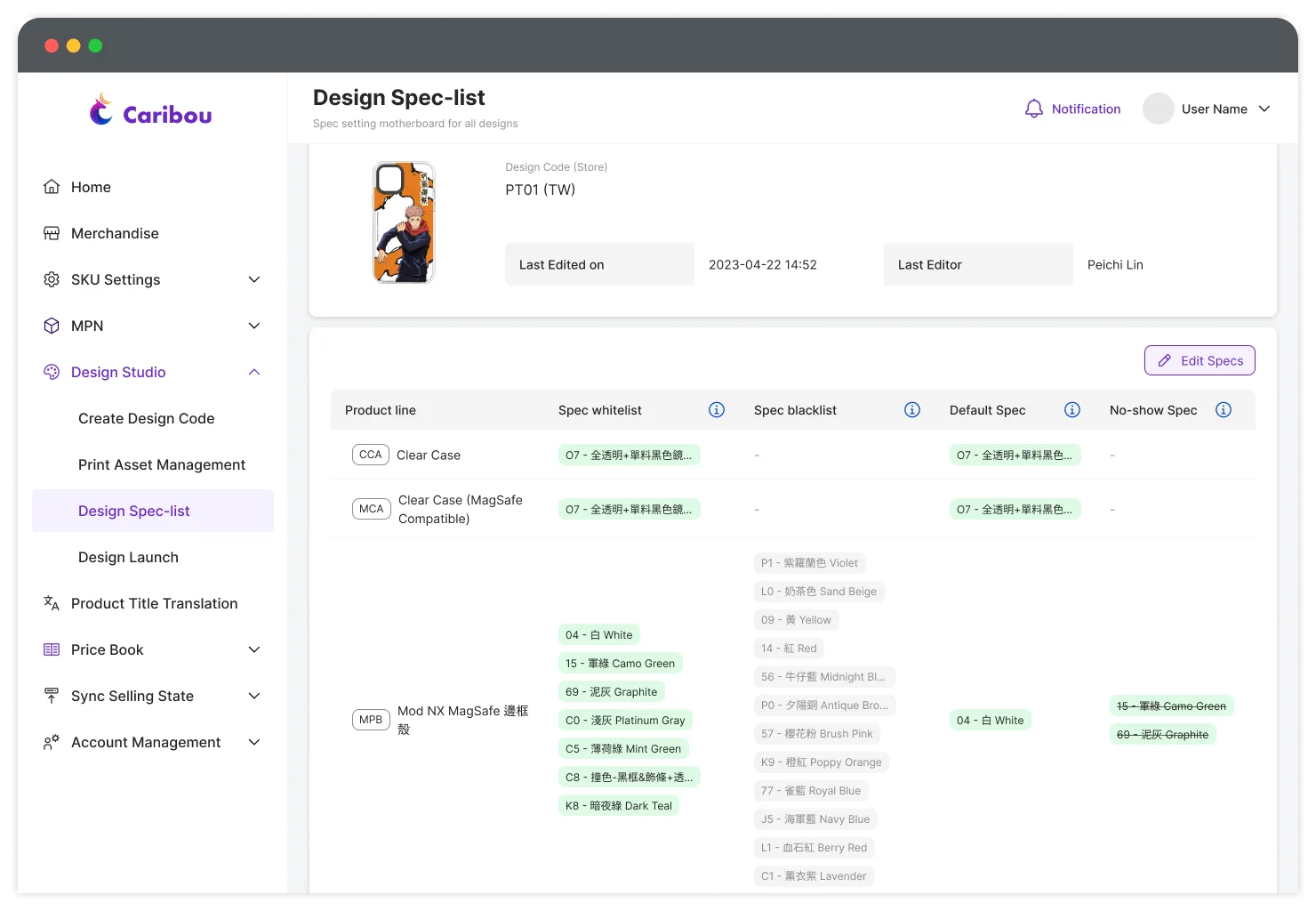
Visualization of printing assets and every product line
Design-spec List—Making storefront behavior visible
Before Caribou, storefront configuration was a tedious maintenance task. Whenever Apple released a new iPhone model, Operational Specialists had to manually update product imagery across all 10 storefronts.
Most collaborations could rely on default display rules, but some printing assets required special treatment. A design might not be legible on a dark-colored case, or a licensing partner might restrict certain product colors. Over time, these exceptions were often buried in handoffs or individual knowledge, making future updates difficult.
Caribou introduced a structured approach to storefront configuration. Users could define rules such as “display this printing on the latest iPhone model,” and apply them across all 10 websites at once. I was also able to take these display rules one step further by defining more specific configuration types:
Spec whitelist for compatible specs
Spec blacklist for restricted specs
Default spec for the product specification shown by default
No-show spec for combinations prohibited by licensing partners
These allow more precise control over how each printing asset appeared on the storefront, while keeping those exceptions documented in one place.
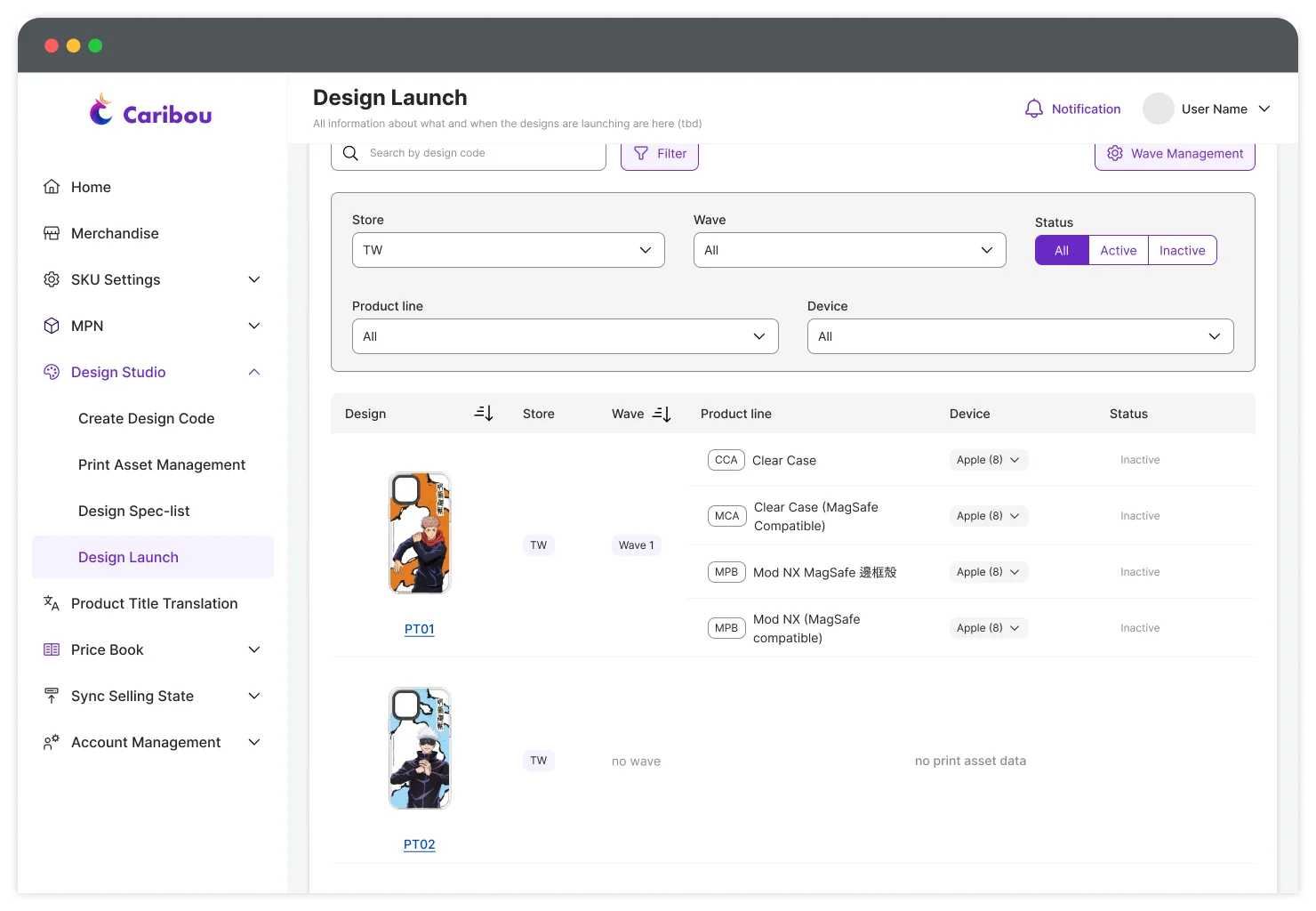
Design Launch—Configure regional availability without repeating the same work ten times
The launch workflow previously required Operational Specialists to manage regional timing and storefront states repeatedly. Caribou now allows regions that share the same configuration to be handled together. Instead of:
Taiwan → configure
USA → configure
France → configure
...
With Caribou, it is:
April 1, 10:00 AM → apply to selected region
Because Caribou automate deterministic complexity into each regional storefront and its corresponding timing logic, now the user can focus on the decision itself.
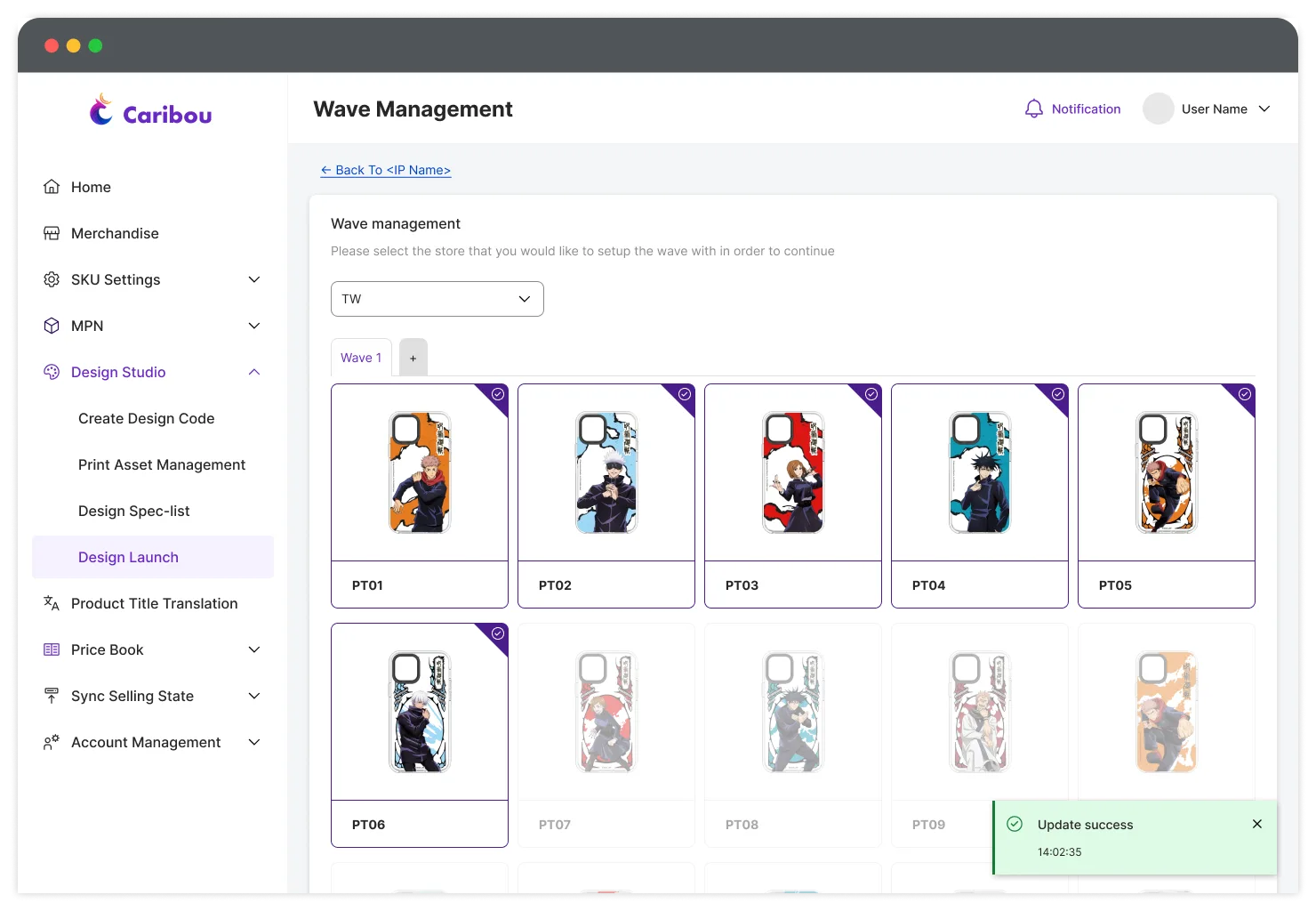
Wave Management
A sublayer within Design Launch, Wave management is particularly important for the Licensing team. Some collaborations are released in multiple waves, and individual designs may be added to or removed from a wave over time.
In practice, Wave Management is another way of organizing launch timing, but from a licensing perspective rather than a product-level one. Previously, this structure existed mostly as internal knowledge within the Licensing team, but Caribou made it visible and manageable, giving users more direct control over how each wave was organized. This also created a clearer data structure for the Data team, allowing them to pull sales performance by wave when requested by Licensing team.
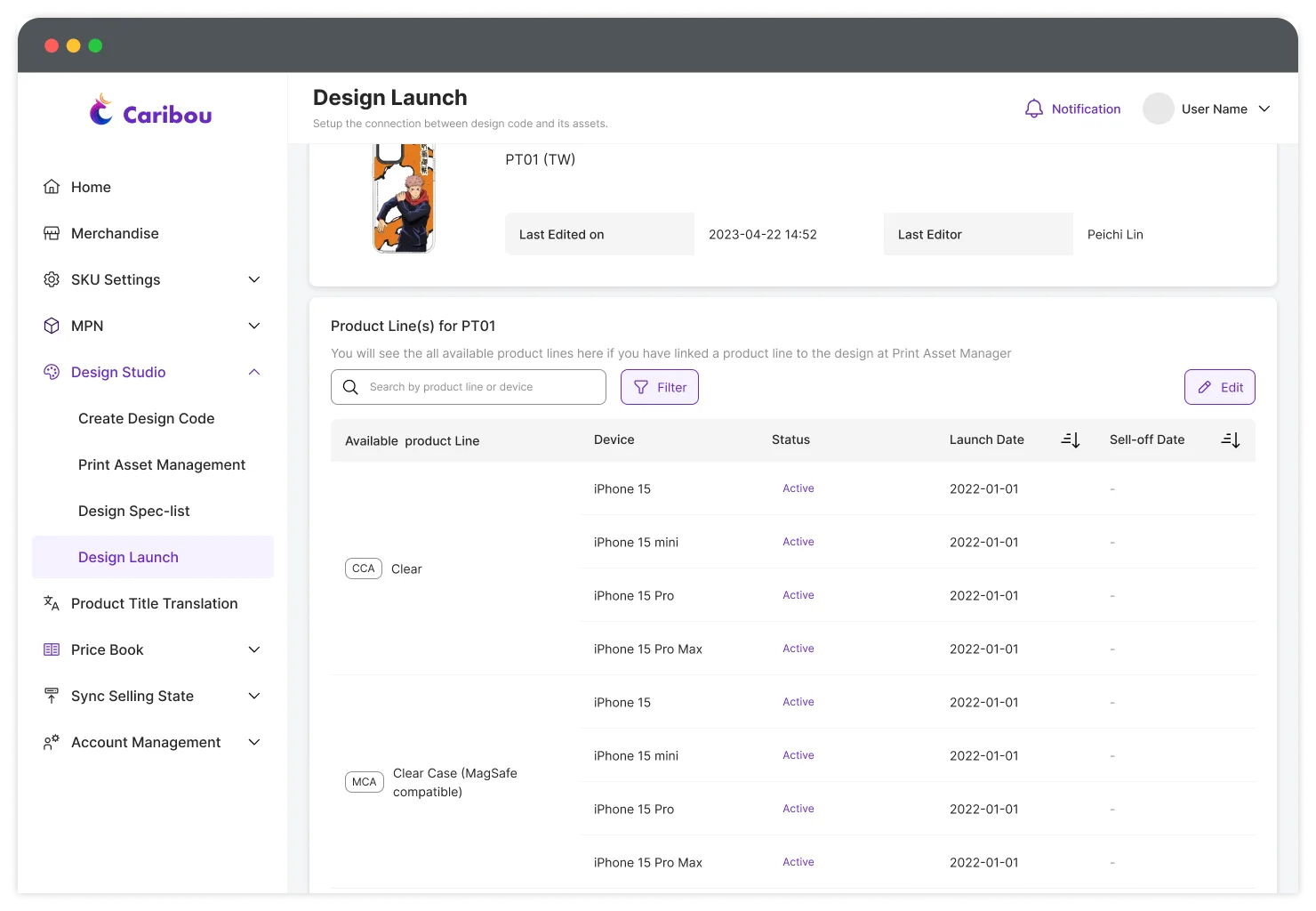
Making the dates traceable
Because of the legacy infrastructure, launch and sell-off dates had to be managed separately for every product line and compatible device model. To make this easier to maintain, each printing asset has its own page showing a complete history of all relevant launch and expiration dates.
While the configuration may look complex, most product and device combinations under the same printing asset share a common launch date. Exceptions mainly occur when new products or device models are added later, requiring their own availability settings.
09—Designing for Confidence
Completion was not enough. Users needed to know whether the result matched their intent.
The old workflow allowed someone to finish a configuration without having a reliable way to understand whether everything was actually correct. That was particularly dangerous at this scale. So the system continually exposes state instead of asking users to remember it.
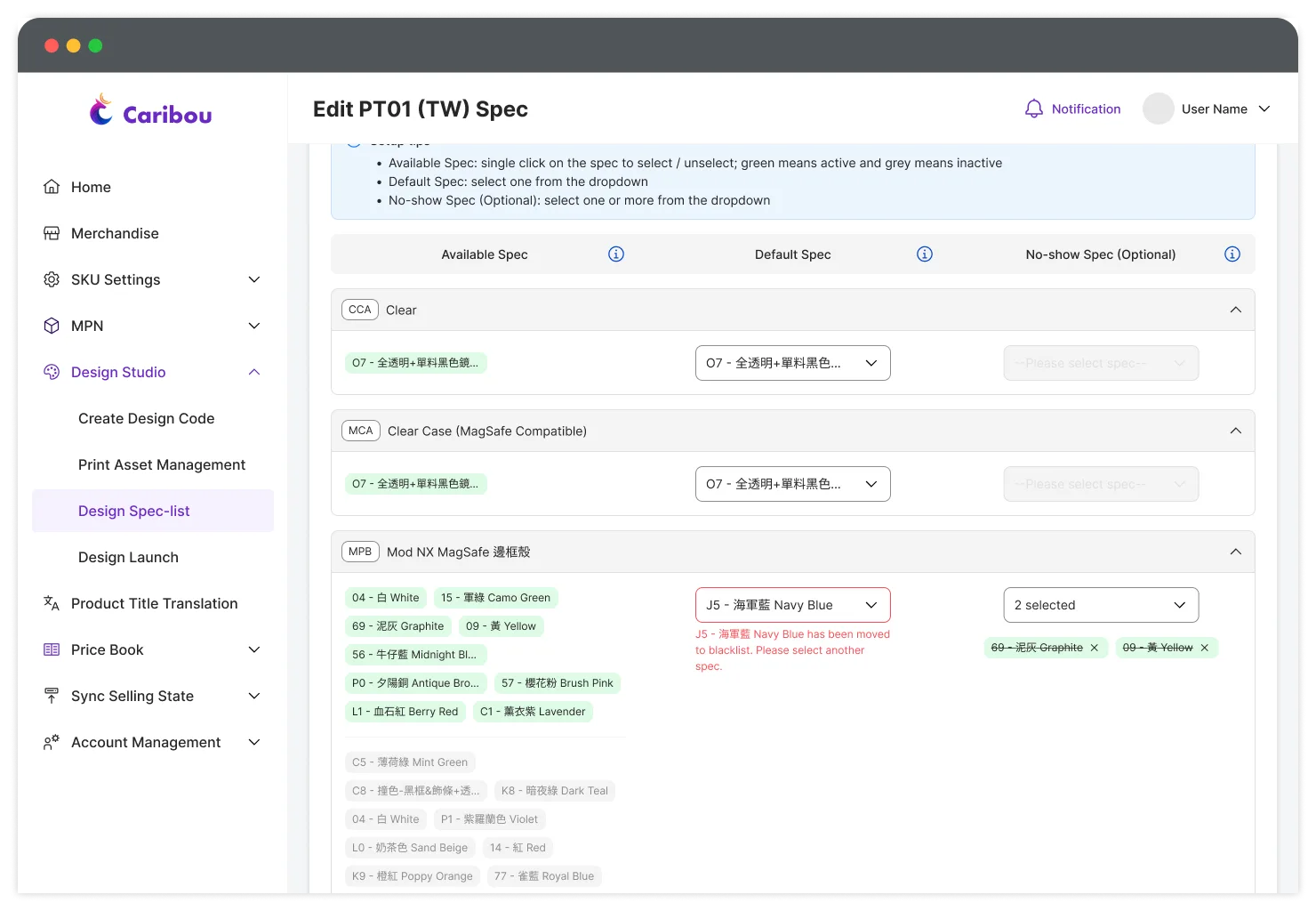
Option list for selecting Design-specs
Change review for managing print assets
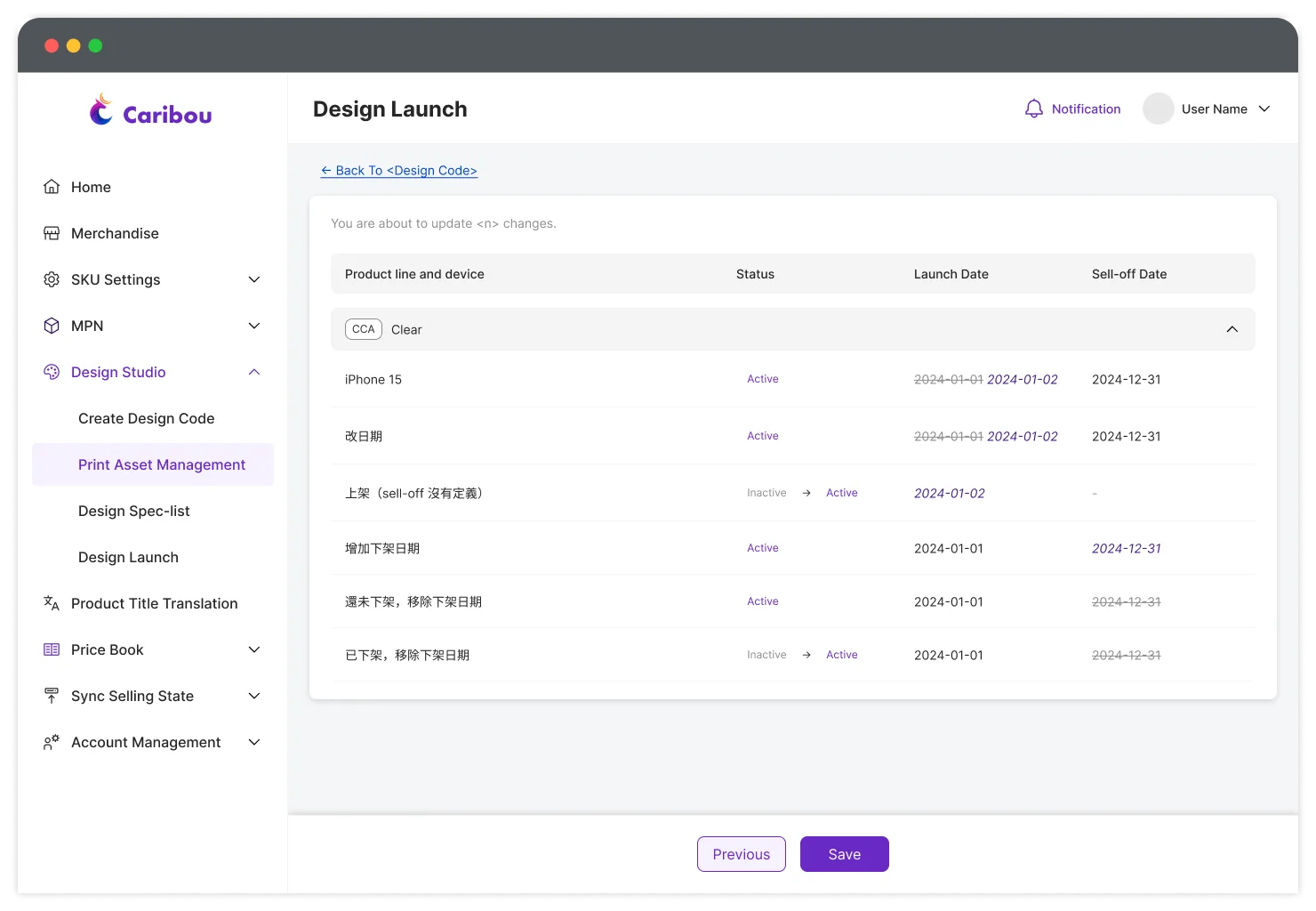
Change review for launch dates
We designed for recovery, but prevention still came first. Caribou not only makes the consequences of each action visible, but also uses guided dependencies and verification checkpoints to reduce the chance of incorrect configurations before any changes are pushed to live.
We did not just design to prevent mistakes. We designed a safe-zone for recover from them.
The premature-launch incident mentioned earlier revealed something important: No amount of interface guidance can guarantee that mistakes will never happen. Complex workflows change, requirements change and people work under deadlines. So recovery became part of the design.
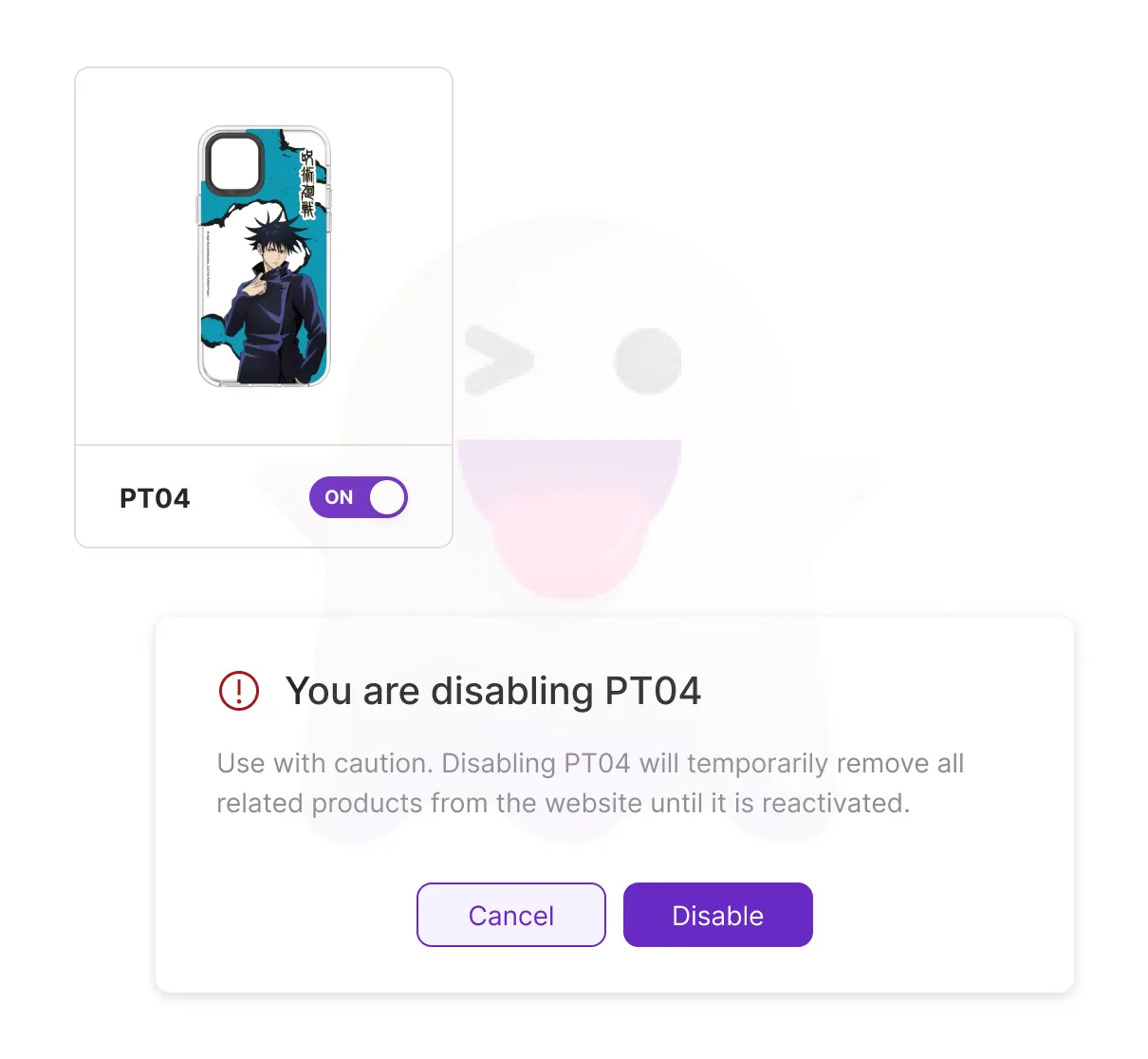
With the Master Switch feature, if a printing causes a problem, the user can just disable that asset directly and the intervention intentionally stops at the printing level.
Now the process turned into:
Problem detected
Licensing team opens Caribou
Printing disabled
Problem contained
This balances speed—in which the team closest to the problem can respond immediately, safety—they cannot unintentionally alter the entire product configuration and accountability—Caribou records who performed an action and when.
We were not giving users unrestricted control. We were giving them a safe way to recover.
10—When the guided workflow is not enough
We knew the guided hierarchy would cover most workflows, but not every edge case. Instead of complicating the primary experience around occasional outliers, we kept the core flow focused and introduced alternative workflows for those less frequent scenarios. For example:
a new phone model is introduced
a new product line launches
a new color has been added to the product line
thousands of existing relationships need to be updated
Forcing these users through a guided workflow repeatedly would create a new inefficiency. And this is why we retained Batch Import.
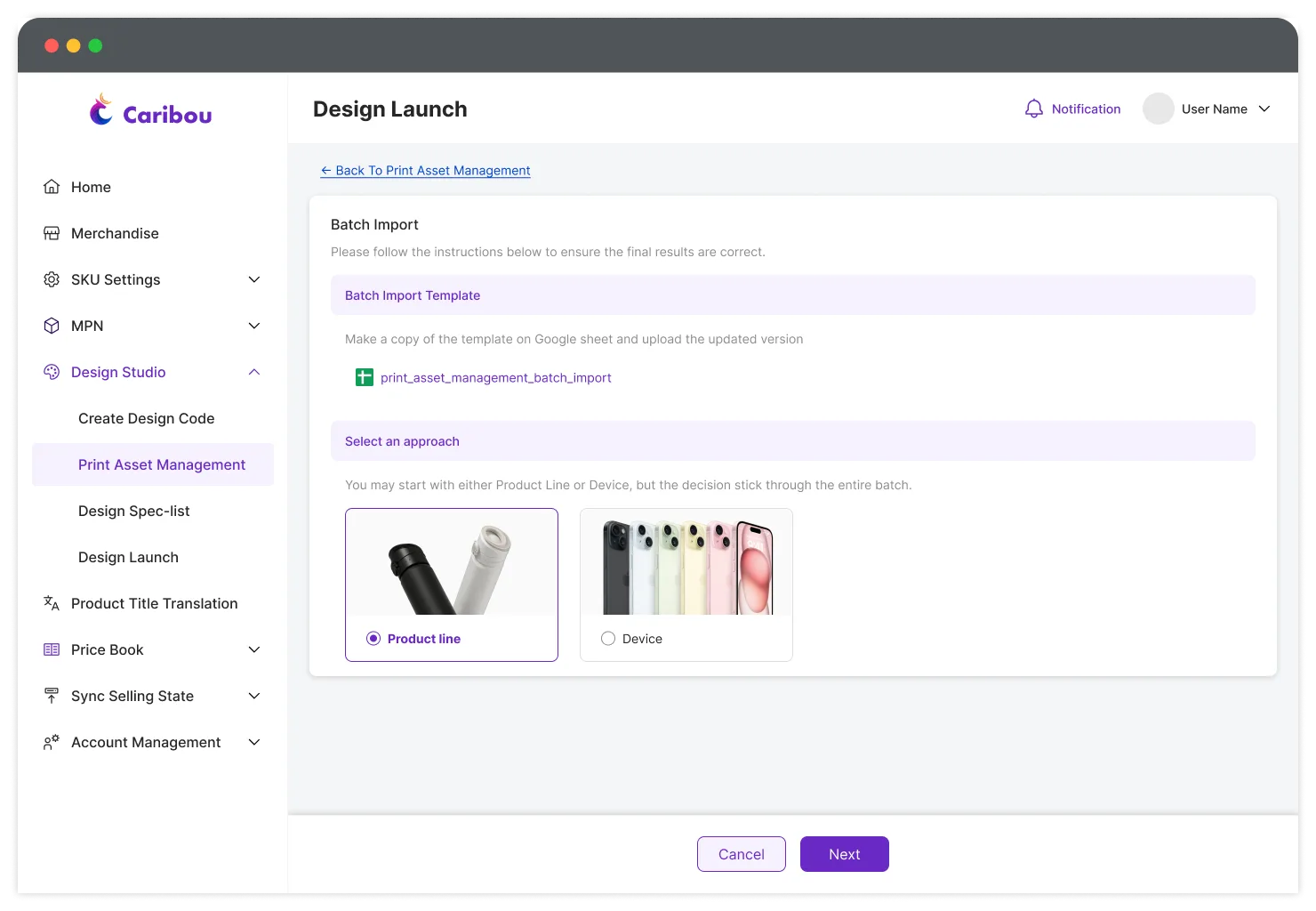
Templates are provided to users with examples of how the correct format should be like
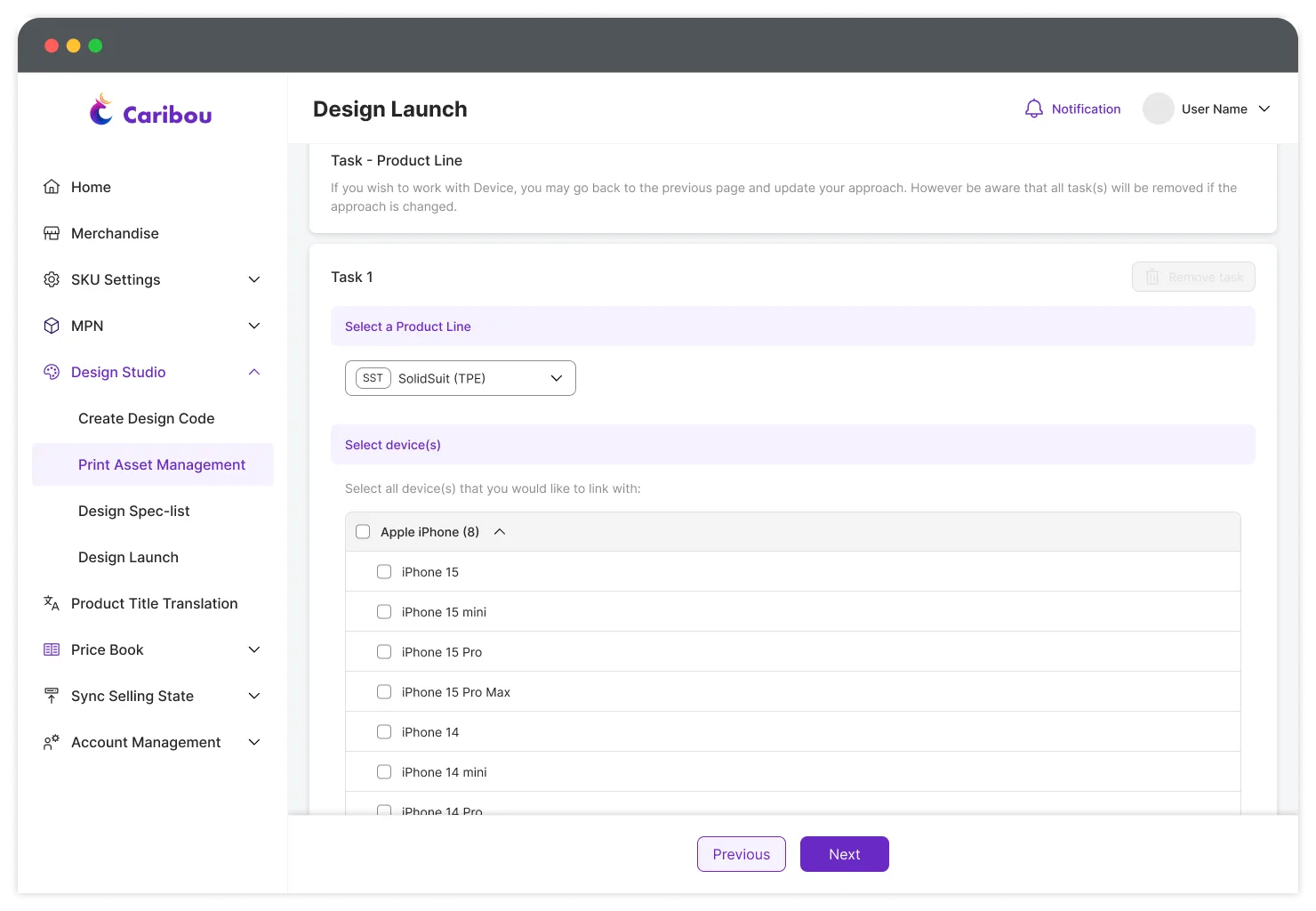
Instructions are specified at each stage
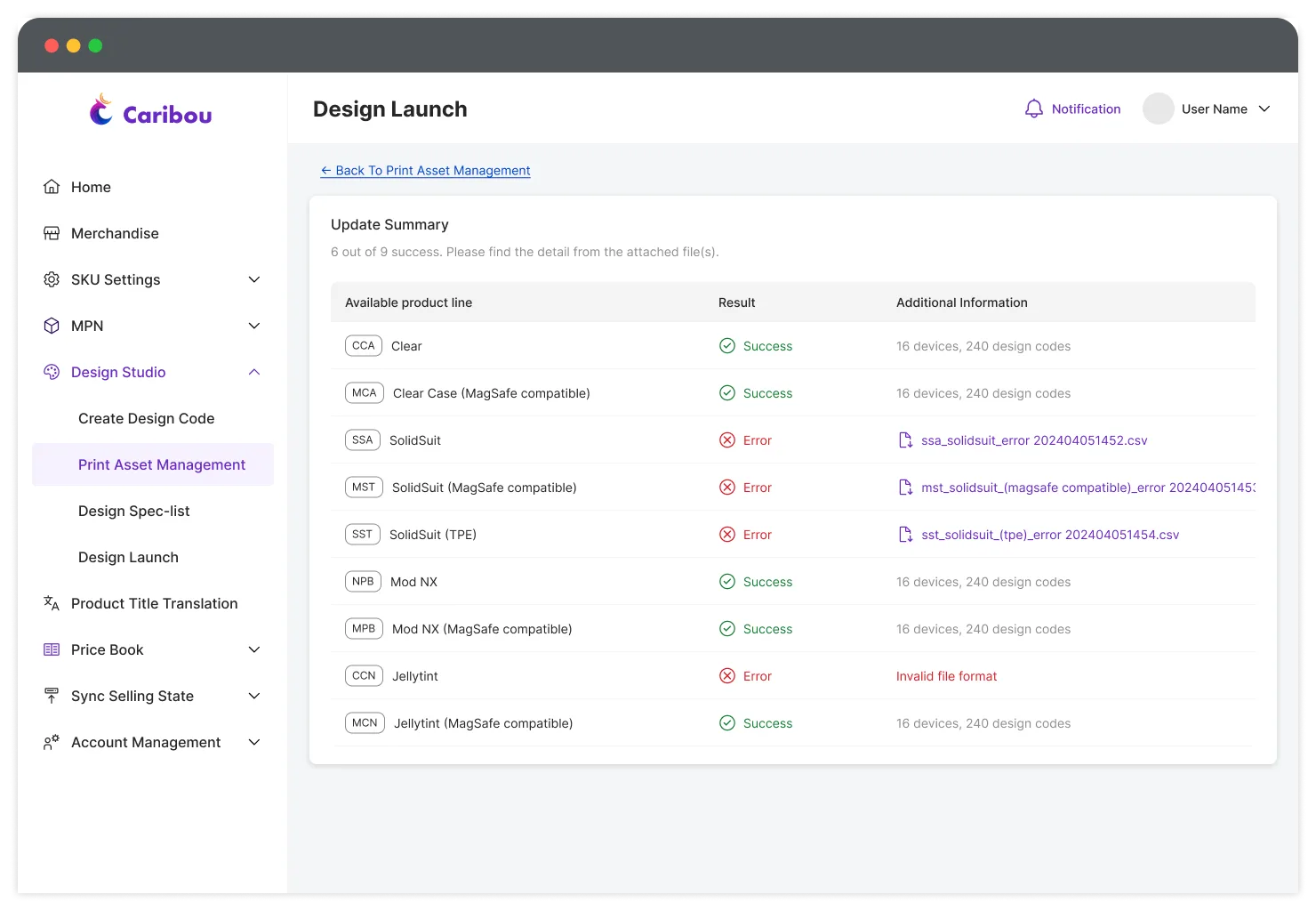
Caribou generates a file that marks the column(s) with error if something failed
Batch Import optimized for:
Scale
Speed
High-volume operations
To better support Batch Import, I designed a dedicated interface for high-volume operations. Experienced users could learn the process quickly by following the guided instructions once, then use it to handle large-scale data changes efficiently. More importantly, this removed the need for Operational Specialists to be involved in the entire configuration workflow. And experienced Licensing users could manage the process themselves and train newer team members, while the underlying SKU complexity remained hidden from them.
Ultimately, the project supported both workflows by design. Batch Import was not a replacement or a “version two.” It existed alongside the guided workflow because different levels of expertise and operational scenarios required different interaction models.
11—Outcome: from operational dependency to controlled self-service
The outcome was not simply a faster admin tool—the relationship between teams and the system fundamentally changed.
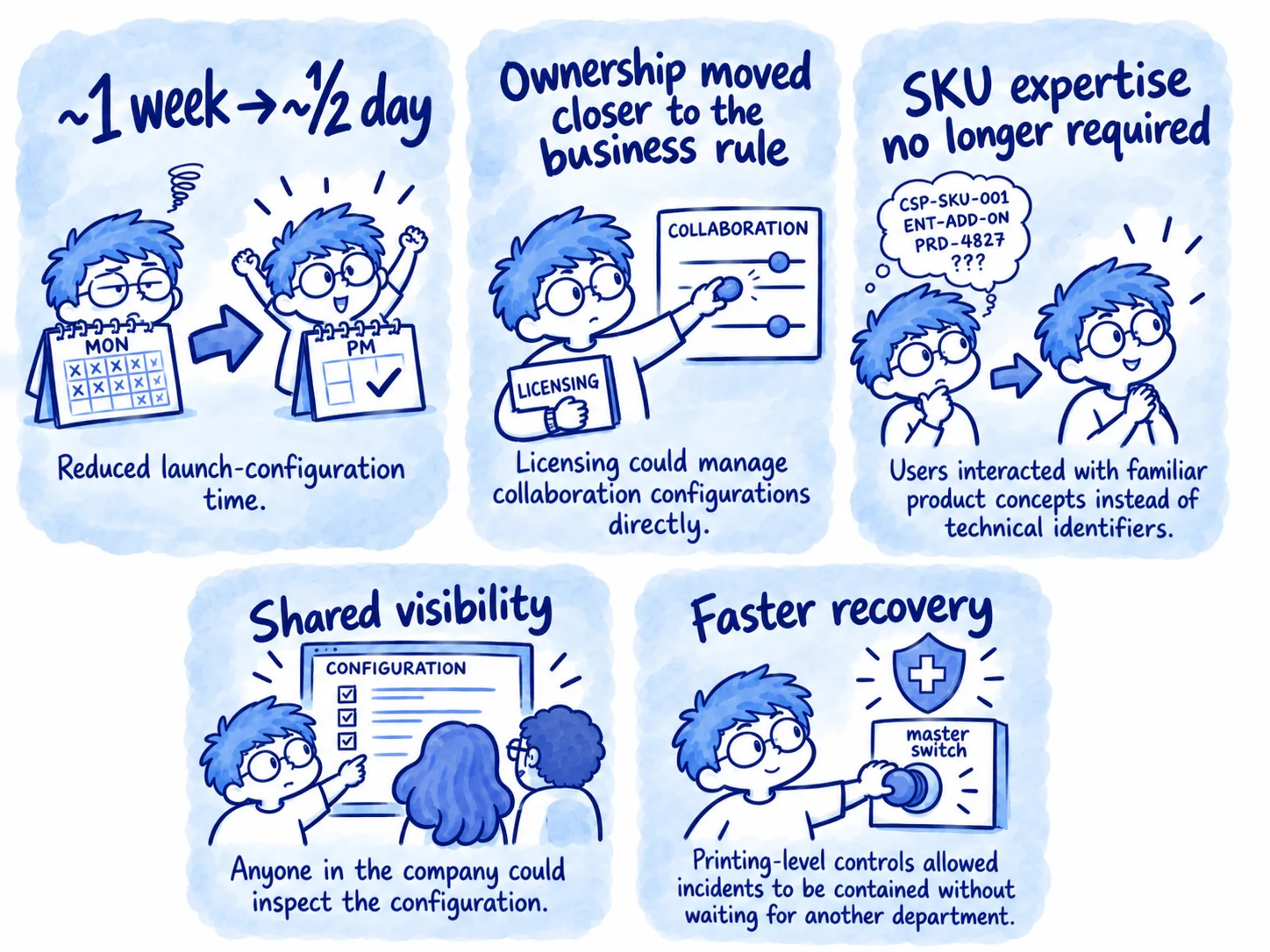
The redesigned workflow reduced configuration time from approximately one week to roughly half a day. Licensing could manage its own printing rules without understanding the underlying SKU structure, while Marketing and Customer Service gained visibility into the same configuration through a shared system.
More importantly, the system now connects the information that people previously had to connect manually. Licensing defines the business rules, Design produces the assets, and Caribou brings everything together in a centralized system. Operational Specialists were removed from the collaboration configuration workflow entirely, freeing them to focus their time on other operational responsibilities.
This organizational shift became one of the most meaningful outcomes of the project: we moved from people connecting information to the system connecting information.
Afterthoughts—The complexity never disappeared
It has been a remarkable journey working on this project. It began with me sitting beside the Operational Specialists, watching them worked through a week-long process that put everyone into pain.
What has always interested me the most is the journey behind a process—how people move through it, where they struggle, and why certain behaviors exist. Looking back, one of the biggest lessons for me was realizing that, as a designer, I should not focus only on solving a problem efficiently. I also need to understand how the solution feels to the people using it. The initial solution was not necessarily wrong, but we made a significant leap toward efficiency without fully considering what we were asking users to understand. This changed the way I think about complexity and how to handle them.
Caribou did not eliminate the complexity of our legacy infrastructure. It moved that burden away from the people who should never have needed to understand it in the first place.
1 Membership System, 10 Markets
Order tracking